Multimodal AI Document Publication
The Publishing Gap
You've done the research. You've written the content. But there's a gap between raw text and a publication-ready document. Generating a quality PDF is hard and professional typesetting requires specialized skills, graphic design knowledge, and hours of manual formatting.
One of those skills is LaTeX (pronounced "lay-tech")—a typesetting system I first encountered writing my senior comprehensive project in undergrad. If you've studied math or computer science, you've probably seen it too. LaTeX is the standard for academic paper publication, producing beautiful documents with precise control over formatting, equations, tables, and citations. It's powerful, but learning it takes time, and writing it by hand is tedious.
DeepAgents PrintShop bridges that gap. It's an open source tool that uses AI to transform your markdown content into professionally formatted LaTeX documents, then compiles them to PDF. You get publication-quality output without learning a new markup language.
What is a DeepAgent?
Before diving into PrintShop, let's talk about what makes a DeepAgent different from a simple chatbot or one-shot AI call.
A DeepAgent is an AI system designed for long-running, complex tasks. Unlike a basic prompt-response interaction, DeepAgents have:
- Persistent Memory — They remember context across sessions, learning patterns and preferences over time
- File System Access — They can read, write, and manage files directly, working with your actual project structure
- Task Management — They break down complex goals into subtasks, track progress, and iterate until completion
- Tool Integration — They use specialized tools (compilers, APIs, validators) as part of their workflow
Think of a DeepAgent less like asking a question and more like delegating to a capable assistant who can work independently, check their own work, and ask clarifying questions when needed.
PrintShop is built on the DeepAgents CLI framework, which provides this infrastructure for building autonomous AI workflows.
What is PrintShop?
PrintShop is a document generation system that uses multiple specialized agents working together. Each agent has its own role, memory, and expertise.
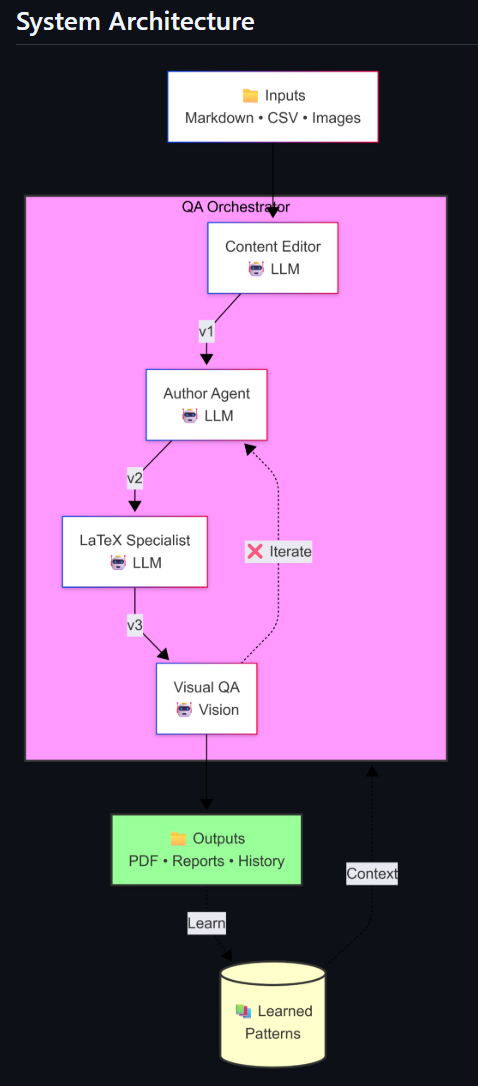
The QA Orchestrator pipeline coordinates:
- Content Editor Agent — Reviews and improves your writing for grammar, readability, and style. Maintains memory of correction patterns.
- Author Agent — Structures content for the target document format, handling section organization and flow
- LaTeX Specialist — Generates proper LaTeX markup with tables, figures, and citations. Learns from compilation errors.
- Visual QA — Uses vision capabilities to verify the final PDF looks correct
The agents iterate until the output meets quality standards. Failed compilations trigger automatic fixes. The system learns from each run, storing successful patterns in persistent memory.
The result? Documents that look like they were typeset by a professional publisher.
A Quick Markdown Primer
If you're not familiar with Markdown, here's the good news: it's designed to be readable even before conversion. You might already be using it without realizing—GitHub READMEs, Discord messages, and many note-taking apps all support Markdown.
The Basics
Text formatting:
**bold text** or __bold text__
*italic text* or _italic text_
***bold and italic***
~~strikethrough~~
Headers:
# Main Title (H1)
## Section (H2)
### Subsection (H3)
Lists:
- Bullet point
- Another point
  - Nested point

1. Numbered item
2. Another item
Links and images:
[Link text](https://example.com)

Code:
Inline `code` uses backticks.

```python
# Code blocks use triple backticks
def hello():
    print("Hello, world!")
```
Tables:
| Column 1 | Column 2 | Column 3 |
|----------|----------|----------|
| Data     | Data     | Data     |
| More     | More     | More     |
Why Markdown for Publishing?
Markdown separates content from presentation. You focus on what you're writing; the formatting system handles how it looks. This is the same philosophy behind LaTeX—and why PrintShop uses Markdown as its input format.
Your content stays clean, readable, and portable. PrintShop transforms it into beautiful typography.
Practical Applications
PrintShop isn't just for research reports. The same pipeline can generate:
Academic & Research
- Research papers with proper citations
- Technical documentation
- Thesis chapters
- Conference papers
Commercial Publishing
- Books — Full typesetting with chapters, table of contents, index
- Magazines — Multi-column layouts with images and pull quotes
- Newsletters — Company updates, industry reports
- Newspapers — Article layouts with mastheads and columns
Business Documents
- Financial statements — Tables, charts, professional formatting
- Credit agreements — Legal document formatting
- Annual reports — Data visualization with narrative
- Proposals — Professional presentation of complex information
The key is that your content lives in simple, editable markdown files. PrintShop handles the complexity of professional typesetting.
How It Works
1. Structure Your Content
Create a config.md with your document metadata:
---
title: My Research Paper
author: Your Name
date: January 2025
document_type: research_report
---

# DISCLAIMER
This document is for demonstration purposes only.
2. Write in Markdown
Create your sections as markdown files:
# Introduction

The field of artificial intelligence has experienced
remarkable growth over the past decade. This research
examines the current state of **machine learning**
technologies.

## Background

Research dates back to the 1950s, but recent advances
in computational power have led to breakthrough innovations.
3. Add Your Data
Drop CSV files for tables, images for figures:
artifacts/
├── sample_content/
│   └── research_report/
│       ├── config.md
│       ├── introduction.md
│       ├── methodology.md
│       └── images/
│           └── performance_chart.png
└── data/
    └── model_comparison.csv
4. Run PrintShop
docker-compose run --rm deepagents-printshop \
  python agents/research_agent/agent.py generate \
  --content research_report
Out comes a professionally formatted PDF.
Best with Claude Code
PrintShop is designed to work seamlessly with AI coding assistants. Claude Code is particularly effective—you can have a natural conversation about what you want:
"Generate a research report from my content, make sure it has a table of contents and proper citations"
"Format this as a magazine with a two-column layout"
"Add a chart comparing the model performance data"
Claude Code reads the CLAUDE.md file in the repository, understands the project structure, and runs the appropriate commands. It's essentially a DeepAgent itself—with file system access, task management, and the ability to iterate until your document is right.
Get Started
PrintShop is open source under the Apache 2.0 license:
GitHub: github.com/kormco/deepagents-printshop
Requirements:
- Docker (for the TeX Live environment)
- Anthropic API key (for Claude-powered generation)
Clone the repo, add your API key to .env, and start generating professional documents from your content.
Try It Yourself
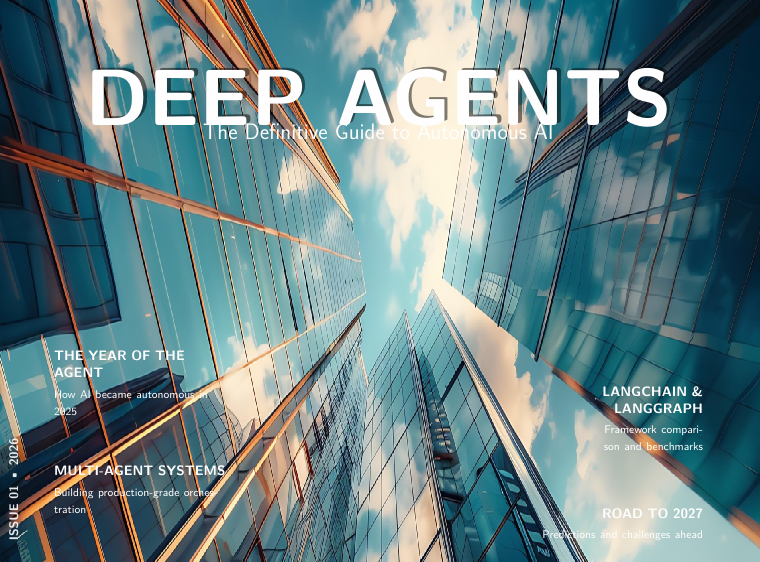
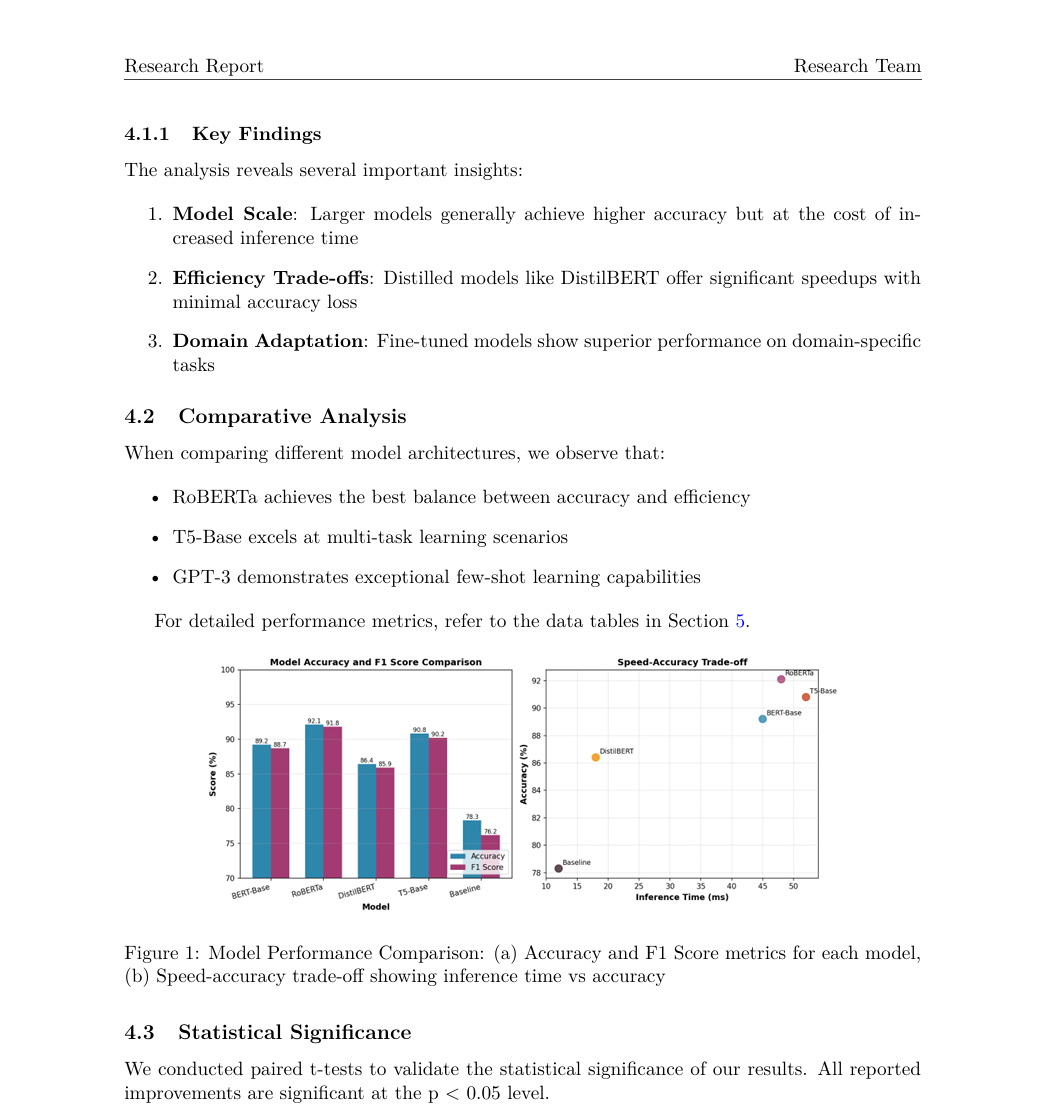
The example outputs shown in this post—the research report and magazine—were generated entirely by PrintShop from simple markdown files and CSV data. No manual LaTeX editing required.
Want to see what it can do with your content? Clone the repo, drop in your markdown, and run the pipeline. The sample content is a great starting point to understand the structure.
PrintShop is open source and contributions are welcome. Whether it's adding new document types, improving the QA pipeline, or fixing bugs—check out the repo on GitHub and jump in.
Your research deserves better than a wall of text. Give your publication a jump-start with printshop!